Hand-Drawn Tangle Mazes for Kids' Activity Books (KDP)
Search Amazon for “hand drawn mazes” or “maze with bridges” and you’ll find buyers who want something different from the usual grid of straight black lines. They want the look of a maze someone drew by hand, with soft curving paths, the odd pen wobble, and paths that loop over and under each other like a ball of string. In a kids’ activity book, that look is often what makes a parent pick your cover over the ones next to it.
Drawing those hand-drawn tangle mazes yourself takes hours a page, and you still have to check every one can be solved. This guide shows how to get the same look from The Maze Generator. You pick one of three style presets, and the engine draws each maze, ready to drop into a print-ready PDF for KDP. It also covers the part most guides skip: keeping bridges safe for the youngest readers.
What Makes a Maze Look Hand-Drawn
There are three visual cues, and each one is something the engine can draw:
- Rounded corridors. Hand-drawn mazes rarely have sharp right angles. The paths curve and swell like they were sketched with a thick marker.
- Bridges (over/under crossings). The main feature of a tangle maze. One corridor passes over another, so the page looks like a knot of paths and not a floor plan.
- An imperfect line. A slight wobble in the walls reads as human, the way a pen line does.
Here is the same 12×12 square maze with the same seed, drawn four ways. It’s one layout, so the only difference is the style:
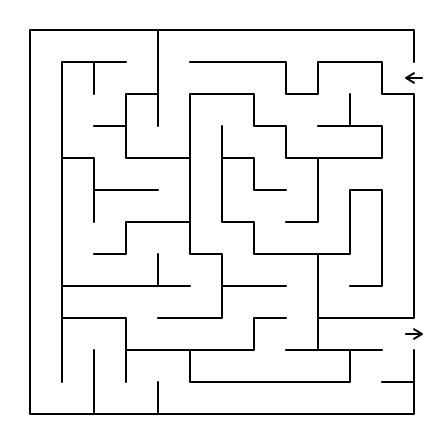
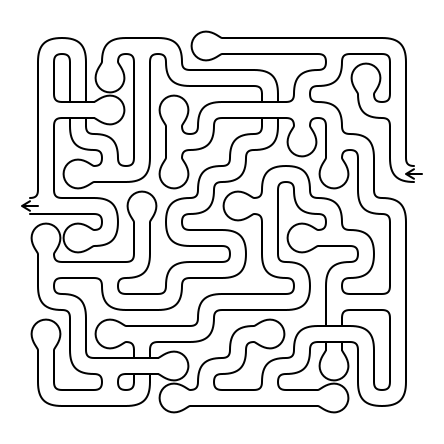
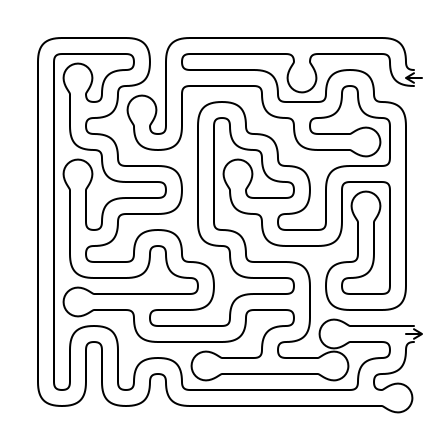
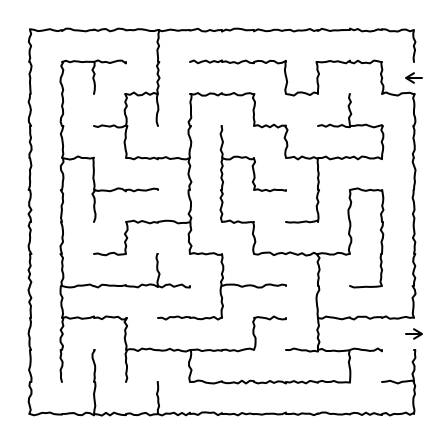
All of these images came straight from our maze engine. None of them were drawn by hand or by an image model. The engine uses classical maze-carving algorithms, so every maze it draws can be solved.
The Four Maze Style Presets
When you export to print, the Maze style control gives you four named presets:
- Classic is the standard look, with straight walls and clean corners. It’s the right choice for logic-puzzle and adult challenge books.
- Tangle (bridges) gives you organic, rounded corridors plus over/under crossings. Under the hood it turns on the organic style and sets the crossings value to 4. This is the full “tangle maze” look.
- Organic gives you the same rounded corridors with no bridges. You get the hand-drawn feel while the maze stays flat and easy to follow.
- Sketch (fuzzy) keeps the classic layout but draws every wall with a fuzzy, pen-like stroke. It looks like a doodle-pad drawing.
You’ll find the preset in two places. The KDP book modal has a Maze style select, and it starts on Match preview, which keeps whatever style you set up on the generator. Each row of a Variety pack also has its own Maze style column, both in Variety books and in Variety batch exports. That means one book can have a Classic warm-up section, an Organic middle and a Tangle finale. The modal’s choice is also the default for any new Variety section you add.
When Bridges Aren’t Available
Bridges depend on geometry. Some of the hexagonal and rhombic variants, and all of the extended tilings, can’t draw over/under crossings. If you pick Tangle for one of those types, the server drops the crossings and keeps the organic corridors, and the book modal shows a short note telling you so. Nothing fails quietly, and you never get a page that breaks its own rules. For a tangle book, stick to orthogonal square grids, which support bridges and are the easiest shape for kids to trace.
Hand-Drawn Tangle Mazes for Kids: Pair Them With Bold & Easy
Bridges add difficulty. A four-year-old who reaches a crossing has to understand that the path ducks underneath and comes out on the far side, and many young children can’t do that yet. Get it wrong and you get a one-star review that says “my child couldn’t do it.”
That’s why the Bold & Easy Edition in the book compiler sets limits on bridges for each age band. Choose a band and the cap is applied on the server, whatever style you picked:
| Bold & Easy band | Bridges with the Tangle preset |
|---|---|
| Ages 4–6 | Off. Crossings are removed and the maze keeps its rounded corridors |
| Ages 7–10 | Capped at a crossings setting of 2 |
| Large Print | Capped at a crossings setting of 2 |
| Ages 11+ | No cap. The preset’s full setting applies |
Here is the Tangle preset after the cap, at roughly the grid size and line weight each young band uses:
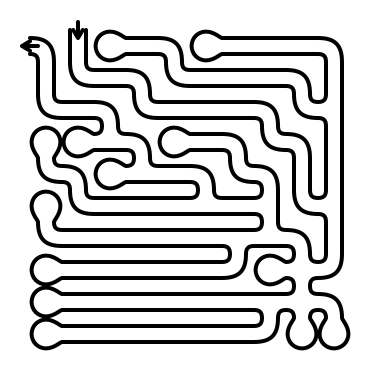
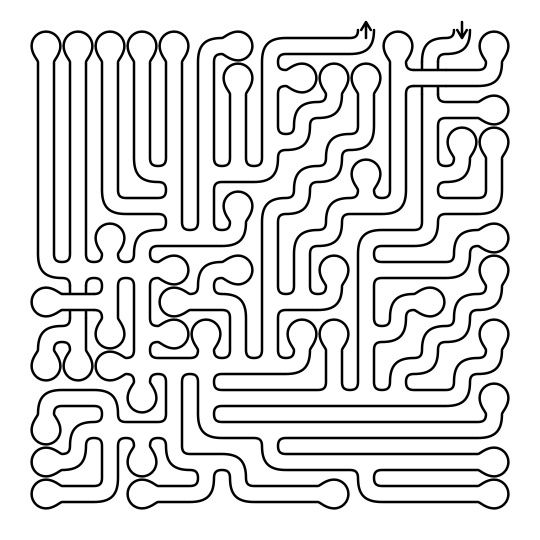
So you can safely pick Tangle once for a whole series. The ages 4–6 book comes out as a friendly, rounded maze book with no bridges, the ages 7–10 book adds a few gentle crossings, and the ages 11+ book gets the full tangle. Each interior still matches the age on its cover. The band settings for grid size, line width and dead ends are covered in our Bold & Easy maze books guide, and the reasoning behind each age range is in the age-appropriate difficulty guide.
Building a Tangle Maze Activity Book: Step by Step
1. Pick a Style Arc for the Book
Readers like to feel they’re getting better. For a mixed-age or ages 7–10 book, a style arc does that well:
- Opening section, Organic. Rounded corridors, no bridges, so the reader learns the look.
- Middle section, Sketch (fuzzy). A change of feel that keeps the pages from looking the same.
- Final section, Tangle (bridges). The payoff. Reaching the bridges feels like moving up a level.
Set this up as a Variety book, with one row per section, each with its own Maze style. The compiler puts them in order and builds a matching solutions section. If you’re doing a single-age Bold & Easy book, use one style throughout and let the band’s cap set the difficulty.
2. Keep Trim and Grid Generous
Organic corridors are thicker than straight walls, so they need room. 8.5×11 inches is the safe trim for a kids’ tangle book. Keep grids small (the Bold & Easy bands do this for you) so a crossing reads clearly as a bridge and not as a smudge. Our print-ready PDF format guide covers bleed, margins and KDP’s file rules.
3. Export at Print Quality
Every PDF, batch and book export uses the same 300 DPI, print-ready pipeline as our classic mazes. The style is part of the export request, so what you set is what gets printed. Each puzzle has its own seed, so no page repeats and every solution matches its puzzle.
4. Write the Listing Around the Look
“Hand-drawn” is what the buyer is searching for, so use it. Something like “Tangle Mazes for Kids Ages 7–10: Hand-Drawn Style Mazes With Bridges” tells a parent exactly what’s inside. In the description, say that the youngest pages have no bridges and later pages add them gradually. That’s a real, checkable selling point, and the interior backs it up. Use one strong sample spread in your A+ content, since the style sells best when shoppers can see it. For other formats in the same space, see our variety maze book guide.
Common Mistakes With Tangle Mazes
- Bridges in a preschool book. Even when the cover says ages 4–6, a page full of crossings will frustrate. Use the Bold & Easy Ages 4–6 band, which removes them for you.
- Grids that are too dense. On a crowded grid, a crossing looks like a dead end. Keep cells large so every bridge is obvious.
- Every page in one style. A whole book of Tangle pages gets tiring. A short Organic → Sketch → Tangle arc keeps it interesting.
- Skipping the solutions. Kids get stuck at a bridge, and the adult helping them needs the answer key. The book compiler adds a seed-matched solutions section, so keep it in.
- Picking a geometry that can’t do bridges. If you want a true tangle maze, use square grids. Other tilings will fall back to Organic.
Which Plan Exports What
You set up tangle styles on the generator’s Advanced Parameters panel (Organic, Crossings and Fuzzy Wall) or with the Maze style presets at export time. Here’s where each workflow sits:
- Pro includes the Advanced Parameters panel, single-maze print-ready PDFs, and batch ZIP exports, including Variety pack batches with a Maze style per row.
- Business adds book compilation: the book modal’s Maze style preset, Variety books with a style per section, and the Bold & Easy Edition with its age-based bridge caps.
See the pricing page for the full comparison.
Start Your Tangle Maze Book
A hand-drawn look sells in kids’ activity books, and tangle mazes are still an uncrowded corner of that market. The Maze Generator handles the hard parts for you: rounded corridors, bridges that are capped for each age band, a seed-matched answer key in every compiled book, and a 300 DPI file ready for upload.
Open the maze generator to try the maze types and settings, then pick the plan that fits your workflow on the pricing page.
Frequently Asked Questions
What is a tangle maze?
A tangle maze is a maze whose paths cross over and under each other on bridges, drawn with smooth, rounded corridors instead of straight walls. The bridges mean a corridor can pass beneath another one and carry on, so the solver can't simply follow a wall. The rounded lines give the page a hand-drawn look that suits kids' activity books.
Can I make hand-drawn style mazes without drawing them myself?
Yes. The Maze Generator draws them with the same engine it uses for every maze. Choose a Maze style preset in the book modal or in a Variety pack row. Tangle (bridges) gives you organic corridors plus over/under crossings, Organic gives you the rounded corridors on their own, and Sketch (fuzzy) gives you wobbly, pen-drawn walls. A compiled book adds a seed-matched solutions section.
Are bridges too hard for young children?
They can be, so the Bold & Easy Edition limits them by age. In the Ages 4–6 band bridges are switched off completely, even if you picked the Tangle preset, and the maze keeps its rounded corridors. The Ages 7–10 and Large Print bands keep bridges but cap the crossings setting at 2. The Ages 11+ band applies no cap.
Which plan do I need to export tangle mazes?
Single-maze PDFs and batch ZIPs, including Variety pack batches with a Maze style per row, are on the Pro plan. Compiling a full puzzle book with the book modal's Maze style preset, including Variety books and the Bold & Easy Edition, is on the Business plan.